Welcome to VXDIAG Official Store
1. We are the Only VXDIAG Official Store in Aliexpress! All our products are 100% original directly from VXDIAG.
2. Advanced quality product, 2 years warranty, online lifetime technical support.
3. 1-7 days fast delivery from overseas warehouse.
4. Support wholesale price and drop shipping.
Looking forward to cooperate with you.
Best wishes!
VXDIAG Team
Notice:
1.The VCX SE includes the lifetime license for 11 Vehicle Brands, it is normal that the authorization is only 60 days old, the license can be updated all the time in VX-Manager for free.
2.We don't provide all software link which is difficult to install.
the option 'VCX SE 11-in-1' does not include the program.
You can get software from legal channel.
3.We don't provide online account for online programming and coding, please get it from official website.
4.Please remember to update the firmware, DoIP, license and driver after you install the latest version VX-Manager V1.8.9.0601 via www.vxdiag.net.
5.We don't provide technical support if your device isn't bought in our store.
6.If you have any problem about this product, please feel free to contact us, thank you^^
FAQ:
1. Shows Error: No device on VX Manager.
A: 🌎Click the reconnect button and check there is Realtek USB from my computer-management-Device Manager-Network Adapters.
🌎If cannot find it means the device is not inserted, please put the cable tightly to the USB port. There is a drip after few seconds means the device has started.
🌎Click the reconnect button again and then VX manager will display the device serial number, indicating that the connection is successful.
2. The Device cannot Connect with the Vehicle.
A: Ensure the vehicle is turned on and in diagnostic mode. Check if the OBD2 port is properly connected, and verify that the USB connection is stable.
3. How to Resolve "License Expired" Issue?
A: 🌎Download VX Manager
Please download and install the latest version VX Manager via www.vxdiag.net.
🌎Update the Firmware
Connect device to laptop, laptop connecting network and open new VX Manager, click "Firmware" to update.
🌎Update the License
Click "Update license" to renew on VX Manager.
4. The device cannot Read Fault Codes or Shows Blank Data.
A: Ensure the device is correctly connected to the vehicle and supports diagnostics for the specific model. Check the network connection. Update firmware and authorization through VX Manager, then restart the device and re scan.
VXDIAG VCX SE for 11+ Vehicle Brands - Car OBD2 Comprehensive Diagnostic Scanner & OEM Programming Tool
Wide Vehicle Coverage
VXDIAG VCX SE car OBD2 diagnostic scanner can work for 11+ car brands, it is the most complete diagnostic scanner device, the supporting car brands are listed as below:
for Mercedes Benz on 2005-2024
for BMW on 2004-2024
for VW on 2001-2024
for JLR on 2007-2016 (for JLR SDD)
for Porsche on 2005-2016 (for Porsche 2)
for Volvo on 2000-2014
for GM on 2000-2020
for Ford on 2005-2022 (F series after 2010)
for Mazda on 2005-2022
for Toyota on 2000-2022 (Old Models with K-Line not Available)
for Honda on 2005-2022
for Subaru on 2005-2022
Please kindly note that the supported car models and year depend on the software version. Our device can support 99% car as above.
Attention: The device does not include the license for JLR pathfinder and for Porsche 3.
Perform Original Function, Replace OEM Device
VXDIAG VCX SE 11-in-1 car OBD2 scanner can perform the same function as original equipment, can replace as the original diagnostic vci, it is cheaper and more cost-effective, worth money.
Compatible with All Official Software
VXDIAG VCX SE 11-in-1 car OBD2 diagnostic scanner support to work with original official diagnostic software on windows system, it is more stable and convenient than other system like Android or Linux.
Multi Online Programmings and Codings
Unlock advanced features such as coding and programming with the VXDIAG VCX SE, enabling you to customize and optimize your vehicle's performance or update ECU software. To access these capabilities, an original online account is required and connect online.
Comprehensive Diagnostic Capabilities
VXDIAG VCX SE car obd2 scanner can access all available system on the vehicles to perform in-depth diagnostics, including reading and clearing fault codes, reading live data stream, retrieving freeze frame, reading ECU info, performing component test...
Multi Services Functions
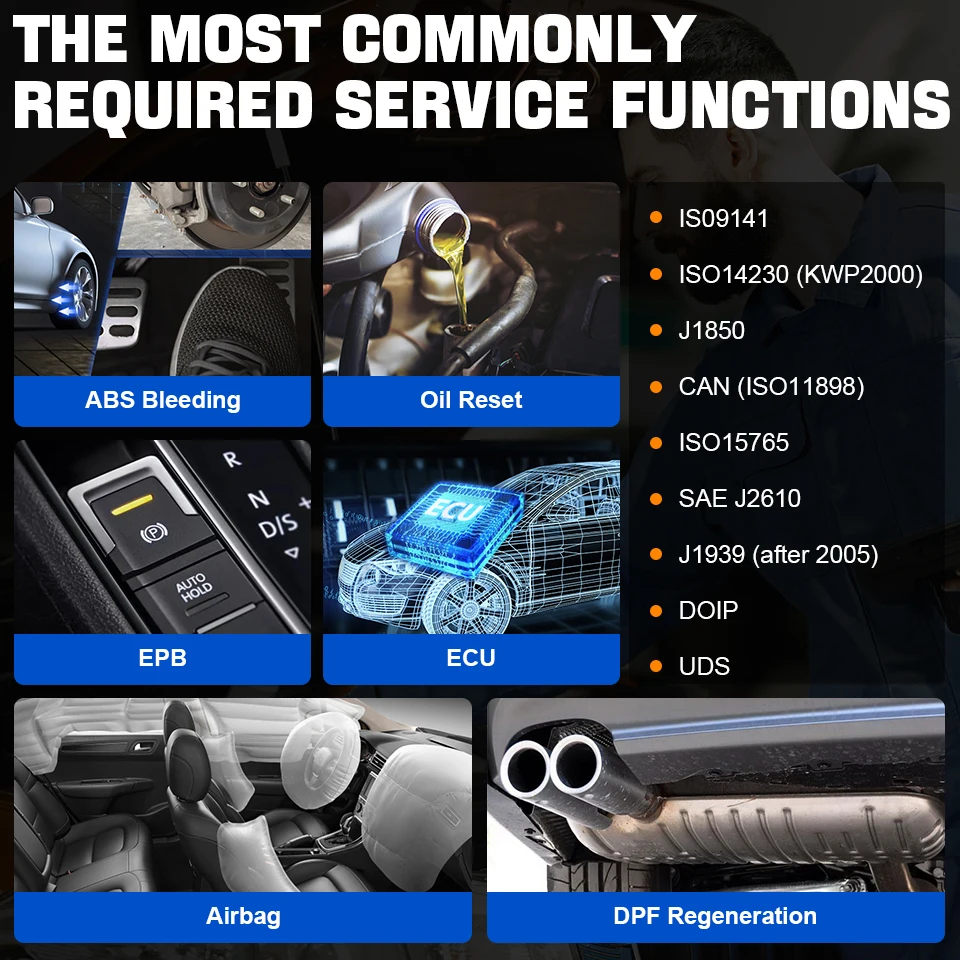
VXDIAG VCX SE 11-in-1 diagnostic tool car OBD2 scanner offers advanced reset services to meet your daily maintenance need, such as oil reset, epb reset, abs bleeding, injector coding, dpf...
Remote Diagnosis
VXDIAG VCX SE car scanner can support to connect the device to you car via Internet cable & WiFi. You can do the diagnosis in your home or let engineer help you do diagnosis in another place.
License & Firmware Lifetime Free Updates
You can update firmware, driver and license in VX Manager all the time if you need, ensuring that the device remains up-to-date with the latest features and improvements over time.
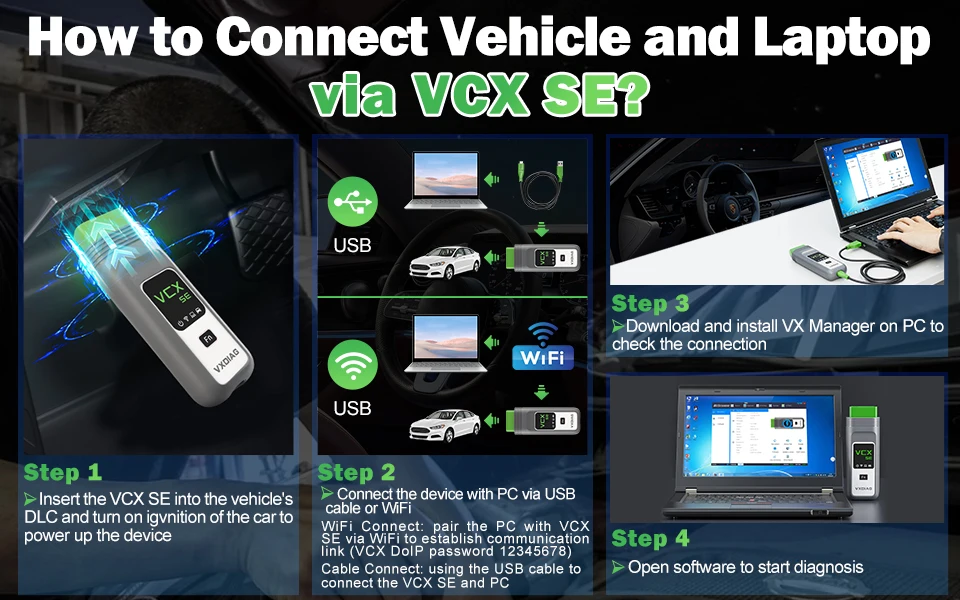
How to Connect VCX SE with Vehicle and Computer?
Please close antivirus software and firewalls and verify that the computer meets the software's system requirements. It does not support Windows Home Edition, Windows XP, and may experience crashes when used in a virtual machine.
1. Download and Install the Diagnostic Software:
you can obtain the official software through legitimate channels. Please follow the installation steps provided in the software package.
2. Connect VCX SE to Laptop and Car:
please connect the VXDIAG VCX SE to your computer via USB cable or WiFi (Select VCX DoIP to pair in available network, password is 12345678) and connect the OBD2 interface of the device to the vehicle’s OBD2 port. Ensure that the device’s indicator light is on, indicating that the device is successfully connected.
3. Download and install VX Manager from VXDIAG Official Website via www.vxdiag.net:
Use VX Manager to update the firmware and license to the latest and then download PASSTHRU and Vehicle-Specific Drivers.
4. Start Diagnosis with Your Car:
Connect device with laptop and car and then open the installed diagnostic software, the software will automatically detect and display the vehicle information.
Select the "Fault Diagnosis" option to enter the diagnostic interface. Choose the system to be diagnosed (e.g., engine, ABS, airbag, etc.). The software will automatically scan the vehicle's systems, read fault codes, and display the diagnostic information.
To perform programming or coding, you need to obtain an online subscription account for the corresponding diagnostic software. Select the "Programming" or "Coding" function in the software. Follow the prompts to choose the appropriate module and operation steps. Before performing programming or coding, ensure that the vehicle’s battery is fully charged, the internet connection is stable, and avoid disconnecting during the process.

ECU Coding
VXDIAG VCX SE 11-in-1 car OBD2 diagnostic scanner can perform online coding to flash the hidden features, personalized settings, or disable the annoying functions, such as turn off the back up beep, turn the seat belt buzzer off. And reprogram the adaptive data for certain components after repairs or replacements. After a component is replaced, to alter the configuration so that the new actuators can be recognized by related vehicle systems.
ECU Programming
VXDIAG VCX SE car OBD2 diagnostic scanner supports online programming + offline programming + J2534 programming, it is more powerful and cost-effective.
Programming function is to finish program/ rewrite/ code/ match new ECU after new module replacement. Taking your business to a new height, it can support:
1) program the new adaptive data to the on-board modules;
2) replace the existing software/firmware in the ECUs;
3) match the component control modules after repair or replacement;
4) flash the hidden functions and disable annoying features;
5) enhance the vehicle performance.
Note: we don't provide original online account for online programming and coding.

Active Test Bi-Directional Control
VXDIAG VCX SE for 11+ brands car diagnostic tool is with actuation test or bi-directional control capacity that can send and retrieve information from a vehicle control module.
The main aim of the actuation test function is to request the control module to perform a specific function including system tests, actuator tests, functional tests, inspection tests, reprogramming or re-initialization, thus saving diagnostic time.
All System Diagnostic
The diagnostics application enables a data link to the electronic control system of the test vehicle for vehicle diagnosis. The device working with official application performs functional tests, retrieves vehicle diagnostic information such as trouble and event codes and live data for various vehicle control systems, such as ABS, SRS, Engine, Transmission, Brake System, Emission System, Fuel system, Light system, Wiper System etc.
Multi Service Functions
For various scheduled service and maintenance include maintenance light reset, throttle learning, steering angle learning, brake pad reset, tire pressure reset, ABS exhaust, battery matching, gear information learning, injector coding, DPF regeneration, headlight matching, gearbox learning, suspension matching, Sunroof initialization, A/F adjustment, electronic pump start, release transportation mode, tire modification, door and window calibration, start-stop setting, language setting, seat calibration, shielding failure, etc.

Turn on the Hidden Function
Following functions can be activated based on the existing configuration model:
*use the button in the cab to close the trunk (electric tailgate), to terminate the reverse operation at any time (available in cars with the electric tailgate)
*activate the Bluetooth phone function,to automatically play the music inside the phone every time you start the car. (Available in models with a USB port in the armrest box or gear)
*support audio and video playback via USB cable as well as via iPod.
*connect to the phone through the Wi-Fi (mobile phones are required to install software)
*open the voice recognition function (currently only available in English digital telephone dialing)
*operate the navigation menu when driving, watch DVD (Even the original car is available with CD, you can also watch DVD)
*Active internet applications (available in post 2012.09 models with professional navigation)
*immediately fold the rearview mirror with the remote control (for the original car, owners need to press the lock key for 1.5 seconds)
*effectively prevent rearend collision because brake lights flash quickly when braking severely (for 3 Series 5 Series, testing)
*automatically released the handbrake (parking button) when the vehicle is started

Support Remote Diagnosis:
Free Donet License--It is support to insert the device to your car and you do the diagnostic in your home or let the engineer to help you do the diagnostic in another place.
